Factorio BlueprintsAll belt balancersFactorio 3 to 2 Balancer Blueprint
Factorio 3 to 2 Balancer Blueprint
Three input belts merged evenly onto two outputs in a 4 x 8 footprint with 4 splitters. Throughput unlimited, so it keeps full speed even when one input runs dry.
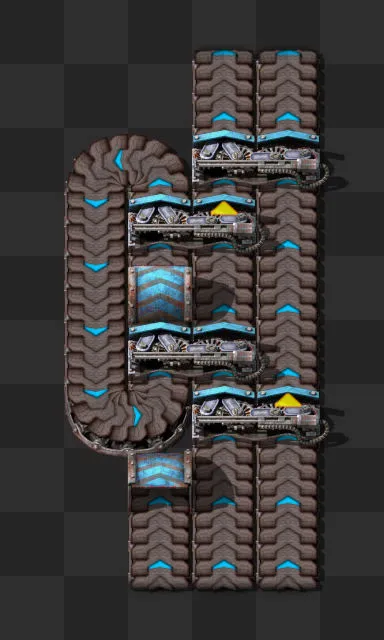
In-game render of the 3 to 2 balancer blueprint
3 to 2 balancer for red, blue and turbo belts
- Input belts
- 3
- Output belts
- 2
- Balancer type
- belt
- Size (tiles, width x length)
- 4 x 8
- Listed belt tiers
- redbluegreen (turbo)
- Throughput unlimited
- Yes
- Input balanced
- Yes
- Output balanced
- Yes
- Entities in the blueprint
- Express transport belts
- 18
- Express splitters
- 4
- Express underground belts
- 2
- String exported by Factorio
- 2.0.69.0
- Designer
- raynquist
String exported by Factorio 2.0.69. Decoded and checked by this site; not test-imported in the game.
Is the 3 to 2 balancer throughput unlimited?
Yes. Throughput unlimited means any group of input belts can feed any group of output belts at their full rate. If some inputs run dry or some outputs back up, the belts that are still in use keep moving at full speed. Choose this layout where belts will often be partly used, such as at the start of a main bus.
Built with express (blue) belts, splitters and undergrounds. The collection lists this layout as working with red, blue and turbo undergrounds, so you can rebuild it in any of those three tiers. Yellow is not on that list, and the collection has no yellow version of this configuration.
Compatible underground tiers listed by the source: red, blue, green (turbo). No yellow alternate in the collection.
- Book
- Raynquist's Belt Balancers Fall 2025
- Book folder
- 3 to x
- Name in the book
- 3-2 TU balancer
- The book covers
- 1-1 to 9-9, plus some 10-x, 12-x, 16-16, 32-32, 64-64 and 128-128 configurations; lane balancers for 1, 2, 3, 4, 6 and 8 belts; yellow-belt alternates in a downgrades folder
3 to 2 balancer blueprint string
Your browser blocked copying. Click the string box, select all and copy it yourself.
The string was exported from Factorio 2.0.69. Copy it, open the game and press Import string on the shortcut bar, then paste. This site decoded the string and checked the entities and size against the preview, but did not import it in the game.